

Import T/DISA 4001
EasyEDA Pro supports importing T/DISA 4001 format files. You can choose to import design documents or extract library files during import.
Functional entrance
- Top menu - File - Import - T/DISA 4001
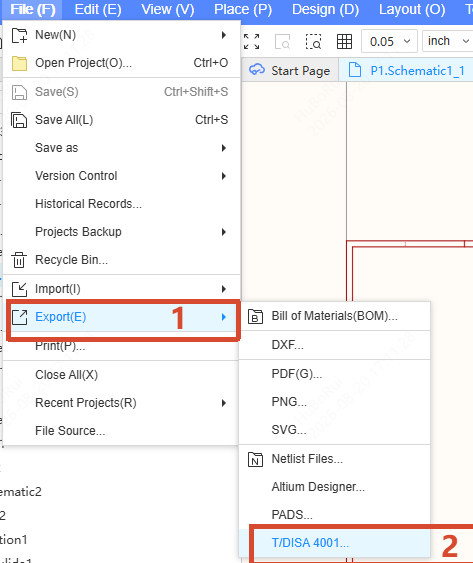
Procedure
After clicking Top menu - File - Import - T/DISA 4001, a file selection window will pop up. Select the file to be imported. The supported file type is DISA 1004 (.zip,.xml.dsym, .json.dsym,.xml.dfoo, *.json.dfoo), and the maximum file size is 1 GB.
After the file is selected, the import settings window will pop up. Click the "..." button to change the file to be imported.
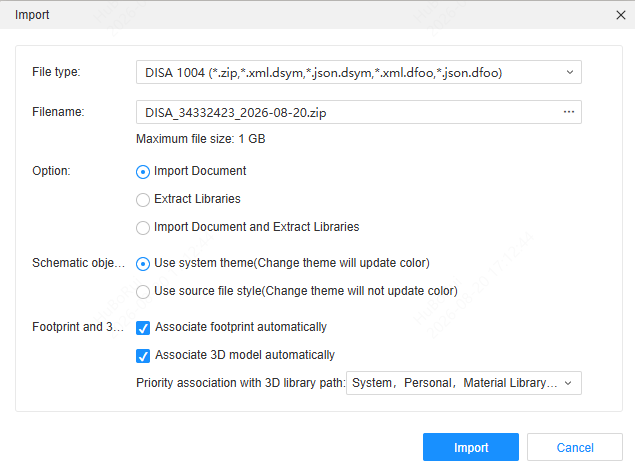
Set the import options as needed, then click the "Import" button to start importing.
Option description
Options:
- Import document: Only import the T/DISA 4001 design document
- Extract library files: Only extract libraries from the T/DISA 4001 library files
- Import document and extract libraries: Import the design document and extract libraries at the same time
Schematic symbol styles:
- Use system theme: The imported schematic symbols use the system theme, and the colors will be updated automatically when switching themes
- Use source file styles: The imported schematic symbols keep the styles of the source file, and the colors will not be updated automatically when switching themes
Footprints and models:
- Auto associate footprints: Automatically associate the corresponding footprints for the components during import
- Auto associate 3D models: Automatically associate the corresponding 3D models for the footprints during import
- Prefer associating 3D library path: Set the library path to be searched first when automatically associating 3D models, such as System, Personal, Parts library, Favorites, etc.
Attention
Due to format and primitive design differences, there may be some differences after import. Please check carefully after importing.