Pad Drill Shape
A "Round Rectangle" option is added to the drill shape of multi-layer pads in the PCB and Footprint Editors, which supports setting the width and height, corner radius, direction and offset.
Entry
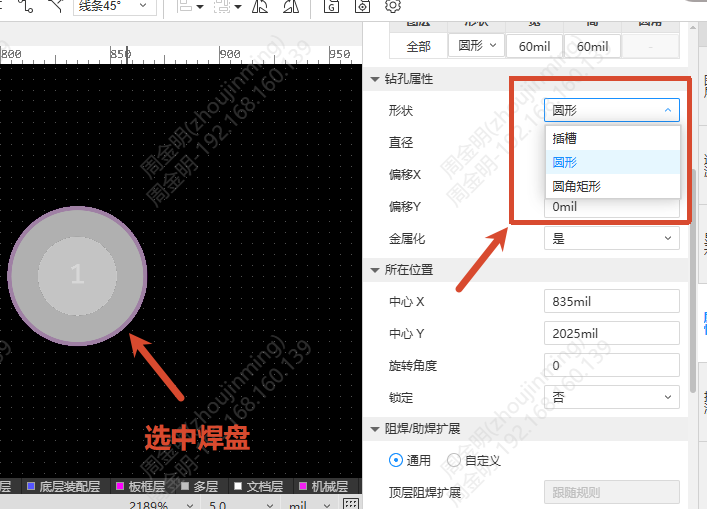
- PCB or Footprint Editor - select a pad - Right property panel - Hole Property - Shape - Round Rectangle
Steps
- Select a pad and switch the shape to Round Rectangle in the hole properties of the right property panel
- Set the following parameters:
- Width/Height: Controls the width and height of the rectangle, minimum 1.2mm. After modification, newly placed pads use the last parameters
- Corner Radius: Minimum 0.3mm. After modification, newly placed pads use the last parameters
- Direction: The rotation angle of the drill hole relative to the pad
- Offset X/Y: The offset of the drill hole relative to the pad
- Plated: Controls whether the inner wall of the drill hole is plated with copper
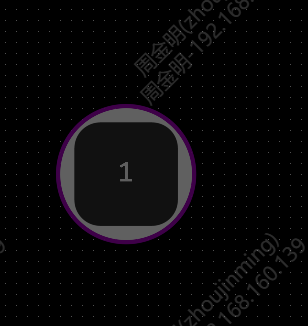
- When the corner radius exceeds "half of the smaller of the width and height", the corner is rounded with this value automatically and displayed as an oblong hole
Export Notes
When exporting Gerber, one round rectangle drill hole is output as four slot holes joined together, and the drill table displays four drill symbols accordingly. Non-Gerber files such as 2D preview, 3D preview and exported DXF/PDF output the round rectangle shape directly.